

Native Microsoft 365 Backup is now a viable first-line option for Exchange Online, SharePoint Online and OneDrive for Business recovery. For many Australian organisations, it will cover the majority of day-to-day recovery scenarios. The honest caveat: it does not protect Teams chat history, Power Platform, Loop or third-party app data, and its backups remain inside your Microsoft 365 tenant boundary rather than in an independent, air-gapped store. Before you commit to native-only, you need to validate three things: workload coverage, retention requirements and Essential Eight alignment.
What Microsoft 365 Backup covers at a glance:
- Protected: Exchange Online mailboxes (item-level), SharePoint Online sites, OneDrive for Business accounts
- Not protected natively: Teams chat history, Planner, Power Platform, Loop, Stream and third-party app data stored outside Exchange/SharePoint/OneDrive
- Practical next step: Enable a protection policy in the Microsoft 365 admin centre and run a restore test within 30 days
For Australian organisations, the decision path is straightforward. If your workloads are Exchange, SharePoint and OneDrive, your retention requirement is 365 days or less, and you have the internal capacity to manage and test restores, native-only may be sufficient. Add a targeted ISV solution where you need Teams chat recovery or longer immutable archives. Engage a managed service such as Next Cyber where you need compliance evidence, tested restore documentation and Essential Eight reporting without building that capability in-house.
Pro Tip: Before enabling any protection policy, run a tenant audit: list your critical workloads, confirm whether Teams chat or Power Platform data is business-critical, and document your retention obligations under the Privacy Act and any sector-specific regulation. That 30-minute exercise will determine whether native backup alone meets your needs.
Key takeaways
Native Microsoft 365 Backup covers Exchange, SharePoint and OneDrive with up to 365 days of retention, but Australian organisations must validate workload gaps, test restores and align controls to Essential Eight requirements before treating it as their complete backup strategy.
| Point | Details |
|---|---|
| Native coverage scope | Microsoft 365 Backup protects Exchange, SharePoint and OneDrive; Teams chat and Power Platform require an ISV or hybrid approach. |
| Pricing model | Pay-as-you-go at USD $0.15/GB/month; no per-user licence, but source workload licences are required. |
| Essential Eight obligation | ASD requires tested restores, point-in-time synchronisation and hardened backup admin accounts at Maturity Level 2 and above. |
| Restore performance | Microsoft 365 Backup supports multi-TB/hour bulk restore speeds; actual RTO depends on process readiness as much as technology. |
| Next Cyber managed service | Next Cyber delivers protection policy design, quarterly restore testing and compliance reporting for Australian organisations across Sydney, Brisbane and Canberra. |
Table of Contents
- What is Microsoft 365 Backup and what does it actually do?
- What is and isn't protected by Microsoft 365 Backup?
- What RPO and RTO can you realistically expect?
- How does Microsoft 365 Backup billing work?
- Why you still need an explicit backup strategy in the cloud
- Which deployment model fits your organisation?
- How to choose an ISV or managed service provider
- How to set up Microsoft 365 Backup and run your first restore test
- How Next Cyber delivers Microsoft 365 backup for Australian organisations
- What to do in the next 7, 30 and 90 days
- What organisations consistently get wrong with Microsoft 365 backup
- Next Cyber's managed Microsoft 365 backup service
- Sources
- FAQ
What is Microsoft 365 Backup and what does it actually do?
Microsoft 365 Backup is a native, pay-as-you-go backup service built directly into the Microsoft 365 admin centre. It uses Microsoft 365 Backup Storage as its underlying platform, which means configuration, monitoring and restores all happen inside the same admin experience your team already uses. There is no separate agent to deploy and no third-party console to manage.
The service protects three workloads: Exchange Online mailboxes, SharePoint Online sites and OneDrive for Business accounts. Restores are granular: you can recover individual mailbox items, specific files or an entire SharePoint site, depending on what you need. Backups are stored within Microsoft 365 trust boundaries, which means they benefit from Microsoft's infrastructure security controls but are not an independent off-site copy.
Key features at a glance:
- Restore point frequency: approximately every 10 minutes for Exchange; periodic cadence for SharePoint and OneDrive
- Retention: up to 365 days of backup history
- Express restore points for faster recovery of recent data
- Granular restores at the item, file and site level
- Role-based access controls and audit logging integrated in the admin centre
- Geographic data residency aligned to your Microsoft 365 tenant region
The pay-as-you-go billing model means you pay for the storage consumed by your backups, not a per-user licence. That makes cost proportional to your data footprint.
What is and isn't protected by Microsoft 365 Backup?
Coverage clarity matters here, because the gaps are where organisations get caught out.
Protected workloads:
- Exchange Online mailboxes: individual email items, calendar entries, contacts and tasks are recoverable at the item level
- SharePoint Online sites: files, folders and full site restores are supported
- OneDrive for Business accounts: individual files, folders or a full account restore
Not protected by the native service:
- Teams chat history (Teams messages are stored in a separate substrate; they are not covered by Microsoft 365 Backup)
- Microsoft Planner tasks
- Power Platform data (Power Apps, Power Automate flows, Dataverse)
- Microsoft Loop workspaces
- Microsoft Stream video content stored outside SharePoint
- Third-party application data connected to Microsoft 365 unless that data resides in Exchange, SharePoint or OneDrive
The architectural limit worth understanding: backups created by Microsoft 365 Backup live inside Microsoft 365 Backup Storage, which sits within your tenant boundary. This is not the same as an independent off-site or air-gapped copy. If a compromised global admin account deletes your tenant or a ransomware actor with elevated privileges targets backup metadata, the native service alone may not provide the isolation a 3-2-1 backup strategy requires.
Pro Tip: Run a quick audit before you finalise your backup strategy. Ask three questions: Does your organisation rely on Teams chat as a record of business decisions? Do you use Power Platform for critical workflows? Do any regulatory obligations require immutable copies stored independently of your primary cloud provider? A "yes" to any of these means native-only backup is not sufficient on its own.
What RPO and RTO can you realistically expect?
Recovery point objective (RPO) defines how much data you could lose in a worst-case scenario. Recovery time objective (RTO) defines how long recovery takes. Microsoft 365 Backup's published figures are worth understanding before you set expectations with your leadership team.
For Exchange Online, restore points are captured approximately every 10 minutes, giving a theoretical maximum data loss of around 10 minutes for mailbox content. SharePoint Online and OneDrive for Business operate on a different cadence, with periodic snapshots and weekly snapshots available beyond the 14-day window, up to the 365-day retention limit. Microsoft's technical documentation provides the authoritative figures for each workload.
For RTO, the practical recovery time depends on what you are restoring. A single mailbox item or file recovers in minutes. A full SharePoint site restore or a bulk mailbox recovery takes longer, and the actual time varies with item count, site size and network throughput. Microsoft's Tech Community guidance highlights that the service is designed for fast bulk restores at multi-terabyte-per-hour scale, which is a meaningful capability for large-scale ransomware recovery scenarios.
Published restore performance: Microsoft 365 Backup is designed to support bulk restore operations at multi-TB/hour speeds, making it operationally capable for large-scale recovery events — not just individual file recoveries.
The caveat for Australian organisations: actual RTO in a real incident will also depend on how quickly you can identify the correct restore point, who has the authority to approve the restore, and whether your runbook is documented and tested. The technology can be fast; the process is often the bottleneck.
How does Microsoft 365 Backup billing work?
Microsoft 365 Backup uses a pay-as-you-go storage billing model. You are charged per gigabyte of backup storage consumed per month. The published reference price is approximately USD per GB per month, billed through Microsoft Azure or a Microsoft 365 billing account depending on your tenant configuration.
Key billing points:
- No per-user licence is required for Microsoft 365 Backup itself, but you must hold the underlying source licences (Exchange Online, SharePoint Online, OneDrive for Business) for the data being protected
- Storage is measured against the backup data stored, not the source data size; metadata and versioning contribute to the total
- Restores do not incur a separate per-restore charge under the current model
- Geographic residency: backup data stays in the same Microsoft 365 region as your tenant, which affects compliance but not the billing rate
Worked example: A tenant with 5 TB of protected backup storage would cost approximately USD $750 per month at the published rate. For Australian organisations, the actual AUD cost will vary with the exchange rate and any Microsoft partner pricing arrangements.
Pricing note: The USD $0.15/GB/month figure comes from Microsoft's published pricing page. Always confirm current pricing with your Microsoft licensing partner, as rates and billing mechanics can change.
Common billing gotchas:
- SharePoint sites with large document libraries accumulate backup storage quickly; audit your largest sites before enabling protection
- Enabling protection across all OneDrive accounts in a large tenant can produce a significant storage bill; consider scoping to business-critical accounts first
- The Microsoft 365 Backup pricing calculator on the Microsoft Learn pricing page lets you model costs before committing
Why you still need an explicit backup strategy in the cloud
The most common misconception in Australian organisations is that Microsoft's infrastructure resilience equals data protection. It does not. The ACSC is explicit on this point: cloud providers manage infrastructure and platform availability, while customers remain responsible for protecting their data and deciding on backups.
Microsoft's own shared responsibility documentation confirms the same boundary for SaaS services: Microsoft secures the infrastructure; you are accountable for data governance, access controls and backup decisions. High availability and geo-redundancy protect against hardware failure and data centre outages. They do not protect against a compromised admin account deleting mailboxes, a misconfigured retention policy purging records, or a ransomware actor encrypting SharePoint libraries.
ACSC guidance states: "Cloud service providers are responsible for the security of the cloud, while customers are responsible for security in the cloud — including their data, identities and access management." Backups and restore testing remain the customer's responsibility regardless of the cloud model used.
The ASD Essential Eight Regular Backups control makes this concrete. Meeting Maturity Level 2 or above requires evidence of tested restores, not just a configured backup policy.
Pro Tip: Apply these hardening controls to your backup environment as a baseline, aligned to Essential Eight guidance:
- Dedicated backup admin accounts separate from day-to-day admin roles (RBAC)
- Break-glass accounts with MFA enforced and access logged
- Retention policies segregated so a single admin cannot delete both production data and its backup
- Conditional Access policies restricting backup admin access to known, managed devices
- Audit log retention covering backup configuration changes
For more on how Essential Eight controls apply in practice, the practical mapping between backup requirements and maturity levels is worth reviewing before you finalise your protection policy design.
Which deployment model fits your organisation?
The choice between native Microsoft 365 Backup, an ISV solution built on Microsoft 365 Backup Storage, and a managed service is not a binary one. Practitioner analysis published in 2026 frames it as three patterns: native-only, third-party only, and hybrid, with the hybrid approach increasingly making sense for organisations that have mixed workload requirements or regulatory obligations that exceed what native backup can satisfy.
Pattern 1: Native-only (Microsoft 365 Backup)
Best fit for organisations whose critical data lives in Exchange, SharePoint and OneDrive, whose retention requirement is 365 days or less, and who have internal IT capacity to manage policies and run restore tests. Lowest operational overhead; no additional vendor relationship. The limitation is the tenant boundary: backups are not an independent copy.
Pattern 2: ISV solution built on Microsoft 365 Backup Storage
ISVs such as Veeam build on the Microsoft 365 Backup Storage platform and API, extending coverage to workloads the native service does not protect (Teams chat, for example) and adding features like longer retention, independent storage locations, and richer reporting. This pattern suits organisations that need Teams chat recovery, retention beyond 365 days, or an independent copy outside the Microsoft tenant boundary. Integration complexity is higher, and you carry an additional vendor relationship.
Pattern 3: Managed service (Next Cyber)
A managed service provider handles protection policy design, monitoring, scheduled restore testing, compliance reporting and incident response. Next Cyber's backup and continuity service combines Microsoft 365 Backup with scoped third-party add-ons where required, and delivers the documentation and tested restore evidence that auditors and insurers expect. This pattern suits organisations that lack internal capacity for ongoing backup operations or need Essential Eight and Privacy Act compliance evidence without building that capability themselves.
| Dimension | Native-only | ISV on Backup Storage | Managed service |
|---|---|---|---|
| Coverage | Exchange, SharePoint, OneDrive | Extends to Teams chat, longer retention | Scoped to client needs; hybrid where required |
| Restore granularity | Item, file, site | Item, file, site, Teams message | Item, file, site; tested and documented |
| Retention and RPO | Up to 365 days; ~10 min RPO (Exchange) | Beyond 365 days available | Aligned to business criticality and SLA |
| Restore speed / RTO | Multi-TB/hr at scale | Varies by ISV | Managed runbook; tested RTO documented |
| Pricing model | Pay-as-you-go per GB | Per-user or per-GB depending on ISV | Monthly retainer; includes testing and reporting |
| Data residency | Within Microsoft 365 tenant region | ISV-dependent; can be independent | Australian data residency confirmed |
| Operational model | Self-managed | Self-managed with ISV support | Fully managed; 24/7 support |
Decision triggers:
- Need Teams chat recovery: ISV or managed service
- Insurer or auditor requires a 3-2-1 immutable copy: third-party or hybrid
- Limited internal IT capacity for testing and reporting: managed service
- Simple Exchange/SharePoint/OneDrive recovery with internal ops capacity: native-only
How to choose an ISV or managed service provider
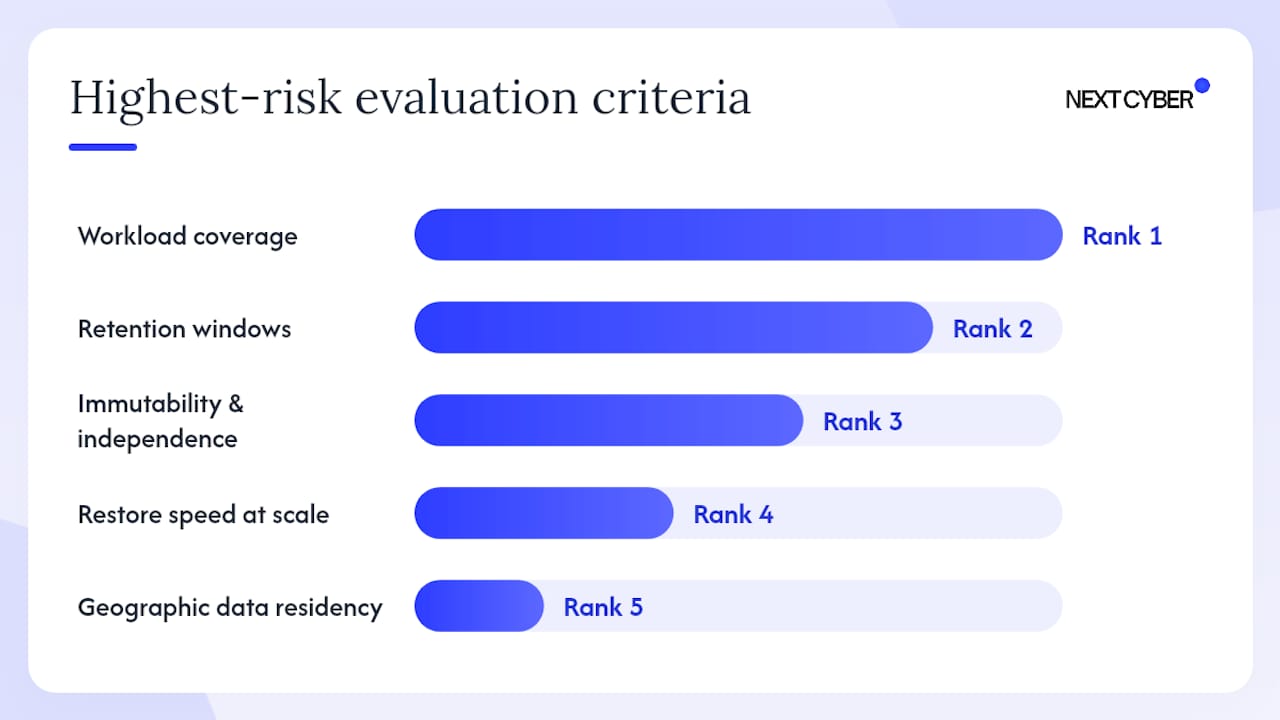
Selecting a backup provider for your Microsoft 365 environment is a procurement decision with compliance consequences. The criteria below are ranked by the risk they address.
Ranked evaluation criteria:
- Workload coverage: Does the solution protect every workload your organisation relies on, including Teams chat, Power Platform or any custom application data?
- Retention windows: Can the solution meet your retention obligations under the Privacy Act, sector-specific regulation or insurance requirements?
- Immutability and independence: Does the solution offer an immutable copy stored independently of your Microsoft 365 tenant?
- Restore speed at scale: Can the provider demonstrate tested restore performance for your data volume, not just a marketing claim?
- Geographic data residency: Is backup data stored in Australia, and can the provider confirm this in writing?
- Audit logging and RBAC: Does the solution produce audit-ready logs and enforce role separation for backup administration?
- SLA and testing cadence: What restore testing frequency is included, and what is the SLA for a declared recovery event?
- Price model and TCO: Is pricing transparent, and does the total cost of ownership include testing, reporting and support?
Questions to ask potential providers:
- What authentication methods does your platform support, and is legacy authentication blocked?
- Where is backup data physically stored, and can you provide written confirmation of Australian data residency?
- How do you handle backup admin account access, and what MFA controls are enforced?
- Can you provide documented evidence of a restore test performed at our data volume?
- What is your exit strategy, and how do we retrieve our backup data if we end the engagement?
- Do you carry cyber liability insurance, and can you support our compliance reporting for Essential Eight or PSPF audits?
Red flags to watch for:
- Refusal to allow an independent restore test before contract signing
- Requirement for legacy authentication or basic auth to connect to your tenant
- No clear role separation between backup administration and general IT administration
- Vague or offshore data residency with no written confirmation
- Inability to produce restore benchmarks or tested RTO evidence
- No documented incident playbook for ransomware recovery scenarios
Shortlisting checklist:
- Confirm workload coverage against your tenant inventory
- Verify data residency in writing
- Request a restore test demonstration or proof of concept
- Review audit log and reporting samples
- Confirm Essential Eight and Privacy Act compliance support
- Check insurance and liability terms
How to set up Microsoft 365 Backup and run your first restore test
Getting Microsoft 365 Backup operational does not require a complex project. The steps below give you a safe, minimal path to protection and a first restore test within 30 days.
Setup steps:
- Sign in to the Microsoft 365 admin centre with a Global Administrator or Backup Administrator account.
- Navigate to Settings > Microsoft 365 Backup and enable the service for your tenant.
- Create a protection policy: select the workloads you want to protect (Exchange, SharePoint, OneDrive) and add representative protection units (mailboxes, sites, accounts).
- Confirm restore point creation: after 24 hours, verify that restore points are appearing for each protection unit.
- Review retention settings and confirm they align with your business requirements and any regulatory obligations.
- Restrict backup admin access: assign the Backup Administrator role only to dedicated accounts, enforce MFA and log all configuration changes.
First restore test plan:
- Select a sample mailbox, a SharePoint site and a OneDrive account that are non-production or low-risk.
- Simulate an accidental deletion: delete a folder of emails, a document library, and a folder of OneDrive files.
- Run an item-level restore for the mailbox and a folder-level restore for SharePoint and OneDrive.
- Record the time from restore initiation to confirmed recovery for each workload. This is your baseline RTO.
- Document the restore point used, the data recovered, and any gaps or errors observed.
Test success criteria:
- All deleted items recovered within your target RTO
- Restore point timestamps match expected RPO cadence
- No errors in the admin centre restore log
- Recovery documented with screenshots or export for audit evidence
Pro Tip: The ACSC's technical guidance on regular backups recommends testing restores as a scheduled activity, not a one-off exercise. Schedule quarterly restore drills and log the results in your change management system. That evidence is what auditors and insurers will ask for.
How Next Cyber delivers Microsoft 365 backup for Australian organisations
A managed service pattern removes the operational burden of backup management and produces the compliance evidence that internal teams rarely have time to generate. Next Cyber's approach to Microsoft 365 and cloud services covers the full lifecycle: scoping, protection policy design, ongoing monitoring, scheduled restore testing and compliance reporting.
Service components Next Cyber provides:
- Tenant scoping and workload inventory to identify what needs protection and what falls outside native coverage
- Protection policy design aligned to business criticality and Essential Eight maturity requirements
- Backup monitoring and alerting: daily checks on restore point creation and policy health
- Quarterly restore exercises with documented RTO/RPO results for auditors and insurers
- Break-glass account design and RBAC configuration for backup administration
- Incident playbooks for ransomware recovery, including decision trees for restore point selection and stakeholder communication
- Compliance reporting for Essential Eight, PSPF and Privacy Act audit requirements
- 24/7 support across Sydney, Brisbane and Canberra
Typical engagement phases:
- Discovery: Tenant audit, workload inventory, gap analysis against Essential Eight Regular Backups control and Privacy Act obligations
- Pilot protection policy: Enable Microsoft 365 Backup for a representative subset of mailboxes, sites and OneDrive accounts; validate restore points and retention settings
- Test restore: Run a structured restore exercise, document results and identify any gaps requiring ISV or hybrid coverage
- Operational handover: Full protection policy in place, monitoring active, reporting schedule confirmed, runbooks documented and handed to the client
For organisations that need Teams chat coverage or an independent immutable copy, Next Cyber scopes targeted third-party add-ons as part of the same managed service, rather than requiring a separate vendor engagement. The Essential Eight assessment and uplift service provides the baseline measurement that informs which maturity level your backup controls need to reach.
What to do in the next 7, 30 and 90 days
Within 7 days:
- Audit your tenant: list every workload your organisation relies on and confirm which are covered by Microsoft 365 Backup
- Identify your retention obligations under the Privacy Act, any sector regulation and your cyber insurance policy
- Confirm whether Teams chat, Power Platform or other unsupported workloads are business-critical
Within 30 days:
- Enable Microsoft 365 Backup in the admin centre and create a protection policy covering your critical Exchange, SharePoint and OneDrive assets
- Run your first restore test and document the results
- Validate Essential Eight alignment: confirm your backup controls meet the maturity level your organisation is targeting, using the ASD Blueprint guidance
- Assign dedicated backup admin accounts with MFA enforced
Within 90 days:
- Decide on your deployment model: native-only, hybrid with an ISV for unsupported workloads, or a fully managed service
- Schedule quarterly restore drills and integrate them into your change management calendar
- Document backup ownership, roles and escalation paths in your incident response plan
- If you need compliance evidence for Essential Eight, PSPF or Privacy Act audits, engage a managed provider to establish the reporting baseline
What organisations consistently get wrong with Microsoft 365 backup
The pattern Next Cyber sees most often is not a technology failure. It is a process failure. Organisations enable a protection policy, confirm that restore points are appearing, and then treat the job as done. Months later, when a ransomware incident or accidental deletion triggers a real recovery, they discover that no one has ever actually run a restore, the backup admin account shares credentials with the general IT admin, and the retention settings were never validated against the organisation's actual regulatory obligations.
The second most common mistake is assuming that because Microsoft 365 is highly available, data loss is not a realistic risk. The ACSC's shared responsibility guidance is clear on this, and it is a point worth repeating internally: availability is not the same as recoverability. A misconfigured retention policy, a compromised account or a malicious insider can cause data loss in a highly available environment just as effectively as a hardware failure.
The corrective action is straightforward: treat backup as an operational discipline, not a configuration task. That means scheduled restore tests with documented results, dedicated backup admin accounts with MFA, and a clear owner for backup policy decisions. For Australian organisations subject to Essential Eight or Privacy Act obligations, that documentation is not optional. It is the evidence your auditor will ask for.
Next Cyber's managed Microsoft 365 backup service
Australian organisations that need Microsoft 365 backup done properly, with compliance evidence and tested restores, have a direct path through Next Cyber's managed IT services. The service covers protection policy design, ongoing monitoring, quarterly restore exercises and the audit-ready reporting that Essential Eight and Privacy Act obligations require. You get a single point of accountability across backup, Microsoft 365 management and cyber security, rather than coordinating multiple vendors.
For organisations that need Teams chat coverage, independent immutable copies or a hybrid architecture, Next Cyber scopes the right combination of native and third-party tools as part of the same engagement. The starting point is a discovery session: a structured review of your tenant, workloads and compliance obligations that produces a clear recommendation and a scoped proposal. To book a discovery session or an Essential Eight assessment, contact Next Cyber directly through the website.
Sources
The links below are the primary sources your technical team and auditors will need for configuration, pricing and compliance alignment.
- Cyber
- Microsoft 365 Backup overview | Microsoft Learn
- Regular backups | Blueprint ASD
- Microsoft 365 Backup vs Third-Party 2026 — Tiago S. Carvalho — Microsoft 365 Architect & Technical Writer
FAQ
Does Microsoft 365 have a built-in backup?
Yes. Microsoft 365 Backup is a native, pay-as-you-go service that protects Exchange Online, SharePoint Online and OneDrive for Business with up to 365 days of retention. It does not cover Teams chat history or Power Platform data.
How much does Microsoft 365 Backup cost?
Microsoft publishes a storage charge of USD $0.15 per GB per month. There is no per-user licence fee, but you must hold the underlying Microsoft 365 licences for the workloads being protected. Use the Microsoft Learn pricing calculator to model your specific cost.
What is the best backup approach for Microsoft 365?
The right approach depends on your workloads and compliance obligations. Native Microsoft 365 Backup suits organisations whose critical data is in Exchange, SharePoint and OneDrive with retention needs of 365 days or less. Add an ISV solution for Teams chat or longer immutable retention, or engage a managed service such as Next Cyber for compliance evidence and tested restore documentation.
Will I lose my emails if I cancel Microsoft 365?
If you cancel your Microsoft 365 subscription, Microsoft provides a limited grace period before data is permanently deleted. Microsoft 365 Backup does not extend access to data after a subscription ends. Exporting or migrating data before cancellation is the only reliable way to retain it.
How does Microsoft 365 Backup align with the Essential Eight?
Microsoft 365 Backup can satisfy the technical backup requirement, but meeting Maturity Level 2 or above also requires documented restore tests, role separation and audit evidence, which typically requires a managed service or structured internal programme.