

Privileged access management (PAM) is the discipline and set of controls that prevent attackers and insider mistakes from abusing elevated accounts across your environment. If you are an Australian organisation deciding where to start, the answer is straightforward: run a discovery exercise to find every privileged account you own, identify your break-glass accounts and confirm they are properly sealed, then plan a pilot mapped to the ASD Essential Eight framework. APRA-regulated entities and organisations with cyber insurance obligations have additional urgency here. Next Cyber works with Australian businesses across Sydney, Brisbane, and Canberra to do exactly this, and the sections below give you the full picture.
Table of Contents
- What privileged access management actually covers — and how it differs from IAM
- Why PAM matters for Australian organisations right now
- How PAM works — the technical components you need to plan for
- Types of privileged accounts and the risks each one creates
- A practical PAM implementation checklist for Australian organisations
- Should you build PAM in-house or use a managed provider?
- How Next Cyber approaches privileged access management
- Key takeaways
- The gap between PAM theory and what actually gets implemented
- Get a PAM readiness assessment from Next Cyber
- Useful sources and further reading
What privileged access management actually covers — and how it differs from IAM
PAM and identity access management (IAM) are related but distinct. IAM governs who gets access to what across your entire workforce, covering authentication, single sign-on, directory services, and lifecycle management for all users. PAM is a subset focused specifically on the small population of accounts that carry elevated, administrative, or system-level rights — the accounts that, if compromised, can cause catastrophic damage. Think of IAM as the broad policy layer and PAM as the high-security vault within it.
The core concepts you need to understand before evaluating any PAM product or project:
- Just-in-time (JIT) access: — privileges are granted on demand for a defined window, then automatically revoked. No permanent elevation, no standing access that can be stolen and used at leisure.
A mature PAM programme treats session monitoring, automatic revocation, and audit trails as non-negotiable controls for compliance and forensics. The functional pillars that flow through the implementation checklist later in this article are: discovery and inventory, credential vaulting, JIT entitlement, session brokering and recording, approval workflows, phishing-resistant MFA, audit logging, and secrets management for non-human identities.
Why PAM matters for Australian organisations right now
Credential theft is the most reliable entry point for attackers. Once a threat actor holds a privileged credential, lateral movement across your environment is fast and often silent. Ransomware operators routinely use stolen domain admin or service account credentials to propagate payloads, disable backups, and maximise dwell time before detonation. Misconfigurations and insider mistakes compound the risk: a service account with excessive rights, left unrotated for years, is an accident waiting to happen regardless of whether an external attacker ever touches it.
The business outcomes PAM delivers are concrete. Reducing standing privilege shrinks the attack surface available to any threat actor who breaches your perimeter. Comprehensive session recording and audit logging give your incident response team the forensic trail they need to understand what happened and when. Cyber insurers are increasingly asking about privileged account controls as a condition of coverage or as a factor in premium calculation, and a documented PAM programme with regular validation is a strong answer to those questionnaires.
For Australian organisations, the regulatory picture adds further weight. The ASD Essential Eight includes Restrict Administrative Privileges as one of its eight mitigation strategies, and the Australian Signals Directorate is explicit that organisations should limit the number of users with administrative access, use separate privileged accounts, and validate those accounts regularly. APRA-regulated entities under CPS 234 face obligations around information security controls that PAM directly supports, particularly around access control, monitoring, and incident response capability. Audit and reporting requirements in regulated sectors make the logging and session recording components of PAM not just a security control but a compliance artefact.
How PAM works — the technical components you need to plan for
A PAM deployment is not a single product; it is an architecture of integrated components. Google Cloud's Privileged Access Manager illustrates the modern approach well: time-bound entitlements, multi-level approval workflows, and audit logging to a centralised log sink. The same principles apply regardless of your cloud provider or on-premises environment.
-
Discovery and inventory. Before you can protect privileged accounts, you need to know they exist. Automated discovery scans Active Directory, Azure AD / Entra ID, local systems, cloud tenancies, and databases to surface every account with elevated rights, including service accounts and application identities that are often overlooked.
-
Credential vault. The vault is the encrypted store for privileged passwords, SSH keys, API tokens, and certificates. Credentials are checked out through the vault, rotated on a schedule or after each use, and never transmitted in plaintext. Users authenticate to the vault, not directly to the target system.
-
Session proxy and brokering. The PAM platform acts as a broker between the user and the target system. Sessions are proxied through the platform, which records keystrokes, commands, and screen activity. The user never receives the raw credential.
-
JIT entitlement engine. Just-in-time access enforces time-bound, task-specific privileges through a request-to-revoke workflow: the user requests elevation, the system verifies identity and context, an approver (human or automated policy) grants the privilege for a defined window, the session is monitored, and rights are automatically revoked at expiry. This eliminates standing privilege and dramatically reduces blast radius.
-
Approval workflows. Entitlement requests route through configurable approval chains. High-risk actions require human sign-off; routine, low-risk tasks can be auto-approved by policy. Automated JIT workflows reduce manual errors, enforce duration limits, and simplify revocation.
-
Phishing-resistant MFA. Privileged sessions must require strong authentication. FIDO2 hardware keys or certificate-based authentication are the standard for privileged access; SMS or TOTP codes are insufficient for accounts with domain-level rights.
-
Audit logging and reporting. Every credential checkout, session, approval, and policy change is logged with tamper-evident records. Log retention must align with your regulatory obligations and incident response needs. Integration with your SIEM or MDR platform enables real-time alerting on anomalous privileged activity.
-
Secrets management for non-human identities. Service accounts, application service principals, CI/CD pipeline credentials, and API keys are often the most neglected privileged identities. A mature PAM programme vaults and rotates these automatically, removing hardcoded credentials from code repositories and configuration files.
Integration checklist: confirm API connectors to your directory services, cloud IAM, ITSM (for ticketed approval workflows), SIEM/MDR for log ingestion, and CI/CD pipelines for secrets injection. Plan for high-availability vault deployment, credential rotation schedules, and session recording storage and retention periods before you go live.
Types of privileged accounts and the risks each one creates
Not all privileged accounts carry the same risk profile. Understanding the categories helps you prioritise controls and avoid the common mistake of vaulting domain admins while leaving service accounts untouched.
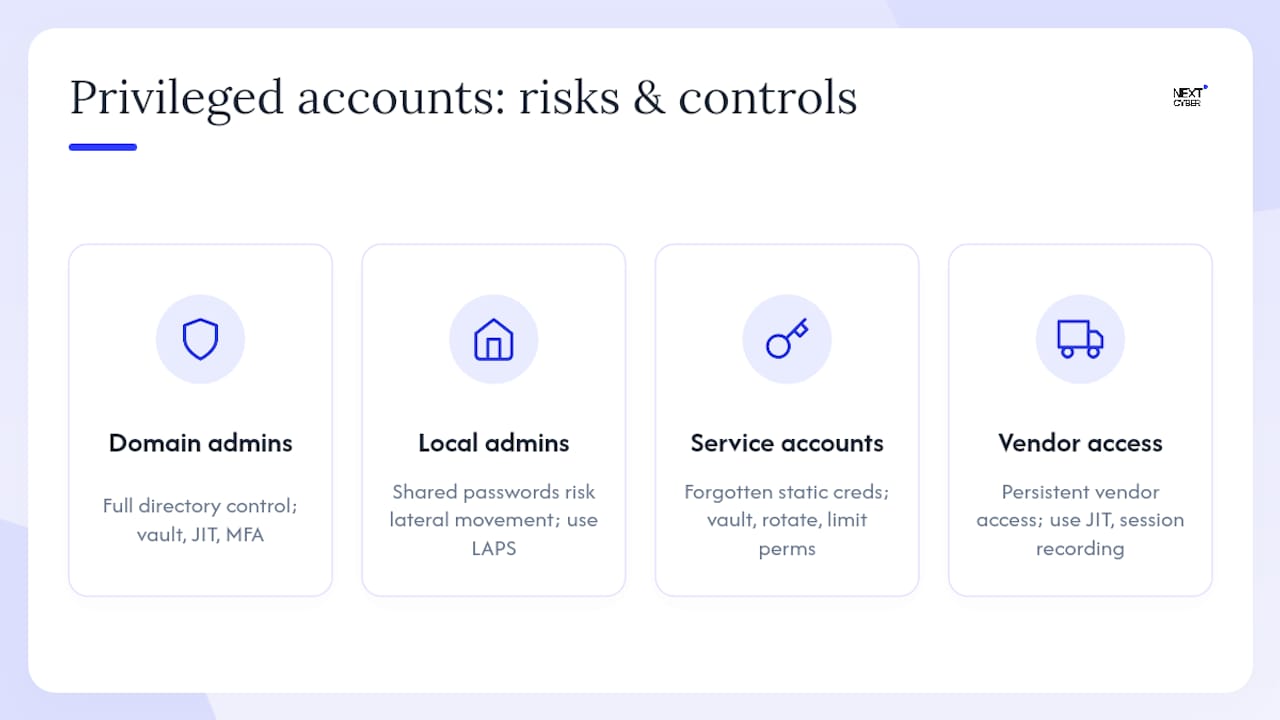
Domain and tenant administrators hold the keys to your entire directory. Compromise here means an attacker can create accounts, modify group policies, and disable security controls. The mitigation is strict: vault credentials, enforce JIT elevation, require phishing-resistant MFA, and limit the number of accounts to the absolute minimum.
Local administrator accounts on endpoints are frequently overlooked. A shared local admin password across hundreds of workstations is a lateral movement highway. Randomised local admin passwords (via a tool like Microsoft LAPS) and endpoint privilege management controls address this directly. Next Cyber's endpoint and device management services complement PAM by reducing the privilege footprint at the workstation layer.
Service and application accounts are often created for a specific integration and then forgotten, accumulating rights over time. They rarely have MFA and their passwords are frequently static. Vault them, rotate credentials automatically, and scope their permissions to the minimum required for the application to function.
Service principals and managed identities in cloud environments are the non-human equivalent of service accounts. Managed identities (Azure) and service accounts (GCP/AWS IAM roles) should be preferred over static credentials where the platform supports them. Where static credentials are unavoidable, vault and rotate them.
Database and API keys embedded in application code are a persistent source of credential sprawl. Secrets management within your PAM platform, integrated with your CI/CD pipeline, eliminates hardcoded credentials at the source.
Vendor and third-party privileged access is a high-risk category that is easy to underestimate. Vendors often retain persistent access long after a project ends. JIT access with time-limited sessions and full session recording is the correct control here.
Emergency (break-glass) accounts sit outside your normal identity flows by design. A break-glass account is a highly privileged emergency account used only when primary authentication systems — including your identity provider and MFA infrastructure — are unavailable. Its credentials must be sealed, its use must be rare, and every use must trigger an immediate incident response process.
Pro Tip: Break-glass accounts lose their value the moment they are used casually or wired into automation. Keep them sealed and cold: store credentials offline or in a physically secured location separate from your normal vault, assign them to no one as a daily-use account, and configure an alert that fires the instant either account signs in. If you find yourself reaching for a break-glass account for anything other than a genuine emergency, that is a signal your normal privileged access architecture has a gap.
A practical PAM implementation checklist for Australian organisations
This checklist runs from governance through to steady-state operations and maps to ASD Essential Eight controls throughout. Work through it sequentially; skipping discovery and going straight to vaulting is one of the most common project failures.
-
Establish governance and policy. Define what constitutes a privileged account in your environment, who owns the PAM programme, and what the approval and exception processes look like. Document your privileged access policy before you touch any tooling.
-
Run discovery and build your inventory. Scan Active Directory, Entra ID, cloud tenancies, databases, and local systems. Every account with elevated rights goes into the inventory, including service accounts, application identities, and vendor accounts. This is your baseline.
-
Classify and prioritise. Tier accounts by risk: domain admins and cloud tenant admins at the top, followed by service accounts with broad permissions, then local admins and application accounts. Your pilot scope comes from the top tier.
-
Configure emergency access accounts. Microsoft's guidance is clear: create two or more cloud-only break-glass accounts, use phishing-resistant authentication (FIDO2 or certificate-based), exclude them from Conditional Access policies that could block access during an outage, store credentials securely and separately, monitor all sign-ins, and validate the accounts at least every 90 days.
Microsoft's emergency access guidance sets a regular validation cadence — test that credentials work, confirm monitoring alerts fire on sign-in, and rotate credentials immediately after any use.
-
Deploy and configure the vault. Stand up the credential vault in a high-availability configuration. Onboard top-tier accounts first. Configure automatic credential rotation schedules and confirm that checkout and check-in workflows function correctly before expanding scope.
-
Design JIT entitlement workflows. For each privileged role, define the maximum session duration, the approval chain, and the conditions under which auto-approval is permitted. JIT access applies equally to human administrators and non-human service identities — design both flows from the start.
-
Enable session brokering and recording. Configure the PAM platform to proxy all privileged sessions. Confirm that session recordings are stored with appropriate retention periods (align with your regulatory obligations and incident response requirements) and that recordings are tamper-evident.
-
Integrate with SIEM/MDR. Forward PAM audit logs to your SIEM or MDR platform. Define alert rules for: break-glass account sign-in, credential checkout outside business hours, failed approval requests, and session recording gaps.
-
Expand to service accounts and non-human identities. Once the human privileged account programme is stable, onboard service accounts, application credentials, and CI/CD secrets. This phase often surfaces the largest volume of previously unknown privileged identities.
-
Establish validation cadence and post-use reviews. Schedule 90-day reviews of all privileged accounts: confirm accounts are still required, validate that permissions remain scoped correctly, and rotate credentials. Every break-glass account use must trigger a post-mortem review — what happened, why normal access was unavailable, and what remediation is needed.
ASD Essential Eight mapping: the Restrict Administrative Privileges strategy directly covers steps 1 through 4 and the ongoing validation cadence. Session recording and audit logging support the Audit Logging mitigation strategy. Phishing-resistant MFA for privileged accounts maps to the Multi-Factor Authentication strategy at higher maturity levels.
Should you build PAM in-house or use a managed provider?
This is a genuine decision with real trade-offs, not a question with a universal answer. The right choice depends on your internal capability, your environment's complexity, and your operational requirements.
Factors that favour an in-house build:
- You have dedicated identity and security engineering staff with PAM product experience.
- Your environment is relatively homogeneous (single cloud provider, limited on-premises footprint).
- You have an existing SIEM/MDR capability that can ingest PAM logs without additional integration work.
- You have the budget and timeline for a multi-month implementation project and ongoing operational staffing.
Factors that favour a managed provider:
- Your security team is small or primarily focused on operations rather than engineering.
- You need to demonstrate ASD Essential Eight alignment or meet APRA obligations within a defined timeframe.
- Your environment spans multiple cloud providers, on-premises systems, and third-party vendor access.
- You need 24/7 monitoring and alerting on privileged activity without building a round-the-clock internal capability.
- You want predictable monthly costs rather than a capital-intensive licence and implementation project.
Cost and timeline considerations for Australian organisations: a PAM implementation project typically runs from initial scoping through to a stable pilot in eight to sixteen weeks for a focused scope, with full environment coverage taking six to twelve months depending on the number of accounts, systems, and integration points. Costs include platform licensing (which varies significantly by vendor and account volume), implementation services, and ongoing operational staffing or managed service fees. A managed service model converts the capital and staffing costs into a predictable per-seat or per-service monthly fee, which suits organisations that need to move quickly without building internal expertise first.
Selection criteria for a managed PAM provider:
- Demonstrated ASD Essential Eight experience and the ability to map PAM controls to your current maturity level.
- Local support with Australian business hours coverage and 24/7 incident response capability.
- Integration with your existing SIEM, MDR, and ITSM platforms.
- Transparent reporting: you should receive regular audit reports, account inventory updates, and evidence of validation cadence.
- Clear SLAs for credential rotation, session recording availability, and incident escalation.
- A commercial model that scales with your environment without punitive overage charges.
Managed IT services that bundle PAM with broader security operations give you a single accountability point and avoid the integration overhead of stitching together multiple point solutions.
How Next Cyber approaches privileged access management
Next Cyber delivers PAM as part of its integrated managed security offering for Australian organisations, with 24/7 support across Sydney, Brisbane, and Canberra. The service is structured to map directly to the implementation checklist above and to the ASD Essential Eight controls that Australian regulators and cyber insurers increasingly expect to see evidenced.
The engagement typically begins with a PAM readiness assessment that covers:
- Session monitoring and SOC/MDR integration: configuring session recording and forwarding PAM audit logs to Next Cyber's cyber security operations platform for continuous monitoring and alerting.
- Break-glass governance: — configuring emergency access accounts to Microsoft's recommended standard, establishing the monitoring and alerting configuration, and documenting the post-use review process.
Next Cyber's technology partnerships keep implementations aligned with current vendor best practice, and the vCIO advisory service can help you build the governance framework and policy documentation that underpins a sustainable PAM programme.
Key takeaways
Effective privileged access management requires discovery, JIT controls, properly sealed break-glass accounts, regular validation, and a delivery model matched to your organisation's internal capability and regulatory obligations.
| Point | Details |
|---|---|
| Start with discovery | You cannot protect privileged accounts you do not know exist — run automated discovery before deploying any controls. |
| JIT and vaulting reduce standing risk | Eliminating permanent elevation and vaulting credentials shrinks the attack surface available to any threat actor who breaches your perimeter. |
| Break-glass accounts need strict governance | Configure at least two cloud-only emergency access (break-glass) accounts with phishing-resistant authentication, exclude them from Conditional Access restrictions, store credentials securely, monitor all sign-ins, and validate at least every 90 days. |
| ASD Essential Eight alignment is the Australian benchmark | Restrict Administrative Privileges, Multi-Factor Authentication, and Audit Logging strategies all map directly to PAM controls. |
| Next Cyber delivers managed PAM | Next Cyber's readiness assessment, vault implementation, and SOC/MDR integration give Australian organisations a structured path to PAM maturity. |
The gap between PAM theory and what actually gets implemented
Most organisations understand the principles of least privilege and JIT access well before they implement them. The gap is almost always operational, not conceptual.

Break-glass accounts are the clearest example. The guidance is unambiguous: seal them, monitor them, test them, and treat every use as an incident. In practice, they get wired into automation scripts, shared informally between administrators, or left unvalidated for years. When a genuine emergency arrives, the account either does not work or its use goes unnoticed because the monitoring was never configured. Neither outcome is acceptable.
Credential sprawl is the second persistent failure mode. Service accounts accumulate over years, their owners leave the organisation, and the accounts persist with broad permissions and static passwords. Discovery exercises routinely surface accounts that no one in the current team knows the purpose of. Vaulting and rotating those accounts is straightforward once you find them; finding them is the hard part, and it requires tooling, not manual review.
The third pitfall is treating PAM as a project rather than a programme. A vault deployment is not the end state; it is the beginning of an ongoing operational discipline that requires regular validation, policy reviews, and integration maintenance. Organisations that treat the go-live date as the finish line tend to find their PAM controls drifting out of alignment with their actual environment within twelve months.
The practical recommendation: start with governance and discovery, get your break-glass accounts right before anything else, and build the validation cadence into your operational calendar from day one. If your team does not have the capacity to maintain that cadence, a managed provider is not a compromise — it is the correct operational model.
Get a PAM readiness assessment from Next Cyber
A PAM readiness assessment with Next Cyber gives you a clear picture of where your privileged access controls stand today, which accounts represent the highest risk, and what a prioritised remediation roadmap looks like for your environment.
The assessment covers discovery and inventory, gap analysis against the ASD Essential Eight, break-glass account configuration review, and a practical roadmap with sequenced recommendations. You leave with a document you can act on, not a generic report. Next Cyber operates across Sydney, Brisbane, and Canberra with 24/7 support, so the engagement does not stop at the assessment. To book an assessment or discuss your PAM requirements, contact Next Cyber through the managed IT services page or visit nextcyber.com.au to get started.
Useful sources and further reading
These are the primary references for the technical guidance and configuration steps covered in this article.
-
Microsoft Entra — Emergency access account guidance: the authoritative Microsoft reference for break-glass account configuration, covering account creation, authentication requirements, Conditional Access exclusions, monitoring, and the 90-day validation cadence.
-
Google Cloud — Privileged Access Manager overview: practical reference for JIT entitlement design, multi-level approval workflows, and audit logging in Google Cloud environments; useful for teams designing cloud-native PAM architectures.
-
Palo Alto Networks — What is just-in-time access?: clear explanation of the JIT request-to-revoke workflow and its role in reducing standing privilege and blast radius.
-
IBM — What is just-in-time access?: covers JIT as a core PAM capability and zero trust enabler, including its application to non-human identities.
-
BeyondTrust — What is privileged access management?: authoritative glossary and component overview covering vaulting, session management, endpoint privilege management, and the relationship between PAM, IAM, and compliance.
-
Tailscale — What is just-in-time access?: practical guidance on automated JIT workflows, duration limits, and integration with PAM and IAM platforms.
-
CloudCook — Break-glass accounts: how to do them properly: operational best practice for keeping break-glass accounts sealed, including storage, monitoring, and mandatory post-use incident and review procedures.
-
Monofor — What is a break-glass account?: concise definition and operational controls for emergency break-glass accounts, useful as a reference for policy documentation.